About
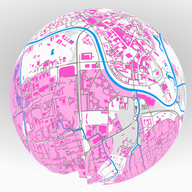
Your place, as a map or a globe
Pick any spot on the map. Globe Maker builds a clean OpenStreetMap export you can print flat, or cut into stripes for a physical globe. Quiet natural colors — or push every layer into something unexpected.
Map mode
Square map for print
Choose a center and size, tune layers and colors, then download a square SVG or JPEG. Hang it as a framed print, light it from behind, or go full poster with saturated custom hues.
Globe mode
Meridian stripes for a sphere
Same city map, remapped for a globe. You get print-ready JPEG stripes (plus pole caps) sized to your diameter — wrap a lamp, build a sphere, or flood the room with soft (or wildly colorful) city light.
How it works
1. Place
Search a city or click the map. Set how wide the square should be.
2. Style
Toggle streets, water, buildings, and labels. Soft natural tones or bold custom colors — your call.
3. Download
Get a square map file, or a zip of globe stripes ready to print and assemble.